Shopping Bag
Audigo helps musicians and creators record studio-quality audio and video with their phones—without the complexity of traditional recording gear. Audigo is an integrated mobile creation platform for recording, mixing, editing, collaborating, and sharing.
Audigo is currently looking to hire a Social Growth Marketing Manager based in San Francisco, CA to both acquire new customers and nurture our current ones.
You will be part of a fast-moving team of marketers, engineers, and designers building a category-defining product for mobile music and video creation.
You'll have the opportunity to define and scale Audigo's social strategy at a pivotal stage of growth, helping shape how musicians and creators discover, engage with, and advocate for the brand. You'll play a major role in the success of our growth, brand development, and customer experience, with immediate visibility into your impact through social performance, sales, and customer feedback.
This is an opportunity to help build Audigo's social growth engine from the ground up, shaping strategy, systems, and programs that will scale alongside the company.
We're looking for a motivated, self-starting, growth-minded, and customer-focused individual who:
Possesses impeccable communication skills across social media platforms, customer engagement, and platform-native storytelling
Has a passion for social media, technology, music, and audio/video creation
Can build strong brand relationships with creators, followers, and customers
Understands the importance of precise and timely communication
Takes pride in solving problems, serving customers, and creating measurable business impact
Define and lead Audigo's organic social strategy, growing our audience, strengthening our brand, and driving measurable business results across social channels by turning followers into customers and customers into advocates
Build and scale a modern social marketing engine that combines content, community, creators, and customer advocacy to fuel awareness, engagement, and conversion
Develop creative campaigns, recurring content programs, and platform-native storytelling that showcase the possibilities of creating with Audigo
Collaborate across marketing, product, customer experience, and creator initiatives to bring compelling stories and customer insights into the social ecosystem
Stay at the forefront of platform evolution, emerging content formats, and social search behavior, identifying opportunities before they become mainstream
Establish goals, measure performance, and translate data into strategic recommendations that improve both social impact and business outcomes
Prior experience in social media, growth marketing, community, or related roles, ideally within music, creator tools, consumer tech, or adjacent creator-focused brands
Proven ability to independently own social strategy and execution in a fast-moving environment
Deep understanding of community management, social brand building, and platform best practices across Instagram, Facebook, YouTube, and TikTok
Strong instincts for short-form video content, storytelling, and audience engagement
Ability to interpret performance metrics and translate learnings into creative strategy
Keen awareness of how paid social and organic social work together
Comfortable leveraging AI tools to improve creativity, efficiency, decision-making, and marketing effectiveness
Exceptional written communication and brand voice judgment
Highly organized, detail-oriented, and self-directed
Thrives in an entrepreneurial environment and enjoys building processes, programs, and systems
Audigo develops a recognizable and differentiated voice across social platforms
Social becomes a meaningful driver of awareness, engagement, and customer acquisition
A scalable content and community engine is established
Creator, customer, and community advocacy become key growth channels
Social insights regularly influence broader marketing and product decisions
Employee benefits at Audigo include medical, dental, and vision insurance as well as a 401(k) plan.
Join a small team where your work will have a direct and measurable impact on product growth, customer experience, and brand development.
The Audigo team has deep experience at companies like Tesla, Oculus, and Sonos, where we've designed, developed, shipped, and sold some of the world's most innovative software and hardware products.
We combine deep experience in consumer hardware, software, audio, and product design with a shared belief that creating great-sounding content should be dramatically easier than it is today.
Please know that while we’ve described what we are looking for in this role, it's quite possible we’ve left out something that might make you (or someone you know) the perfect candidate for the job. So if you think you can make an impact at Audigo, no matter who you are, please email careers@audigolabs.com to apply for this position.

The new 5.0 version of the Audigo app encompasses the largest set of updates we’ve made to the app since we first launched, with the focus to provide quicker and easier access to multiple controls and features during the recording, playback and edit processes. *
While streamlining the overall experience, it also gives our team the building blocks to introduce more of the exciting features we have planned. And while we were at it, we added a couple new bits and pieces we think you are going to like.
Here’s a quick rundown of the most significant changes:
Persistent Transport Controls: The Play and Seek to Start buttons are now accessible at all times, so reviewing a just recorded track or adjusting effects while it plays is seamless.

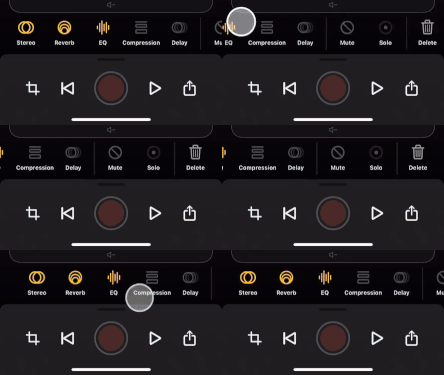
Effects: All audio adjustments are now accessible through a swipeable selector for easy access. Tapping brings up the effect settings and playback controls in a single interface, allowing you to start, stop and scrub to a desired section of a track while adjusting the audio.
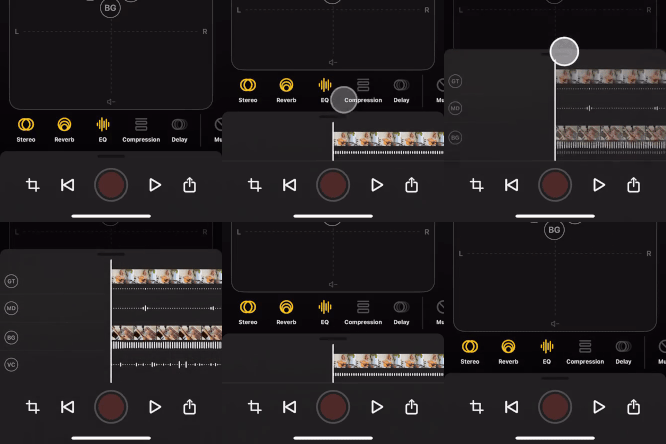
Track Stack Options: The display of waveforms and videos thumbnails above the transport controls can be adjusted in both record and edit mode to show a single project summary track or all individual tracks.
And now for some new stuff!
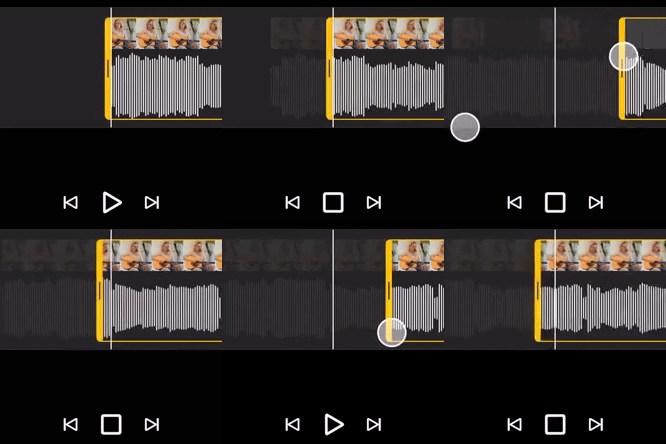
Trim 2.0: The project trim experience is larger with “pinch to zoom” control for more granular trim point selection and includes persistent Seek to Start and End buttons.
Solo: Looking to really sweeten the sound on that one track? Just tap the Solo button to isolate it and listen to just that single track during playback.

Track Naming: Now you have the option to add individual track names in addition to two character track tags, accessible from a new track selector strip.

We look forward to your feedback. Reach us at info@audigolabs.com
Thank you,
The Audigo Team
* Starting with version 5.0 Audigo will require iOS 16 or later. This change allows us to focus on improvements that take full advantage of the latest technology. Please update your iOS to continue enjoying new features and improvements. We appreciate your understanding and continued support.
This guide is a comprehensive look at the Audigo system, including the mic, the app, setup, recording, playback, mixing & editing, sharing & exporting and collaborating on projects.
We recommend you also look at our FAQ and Support pages for answers to common questions and troubleshooting tips for specific issues.
Overview
Connectivity
Controls, Lights and Charging
Using the Mount
Project List
Audio Record
Video Record
Edit
Create a New Project
Import
Soundcheck
Toggle Camera On and Off
Create an Audio Recording
Create a Video Recording
Saving or Discarding a Recording or Stopping a Transfer
Multitrack Projects
Using Headphones with Audigo
Edit Track Name
Deleting a Track
Adjust Track Level and Pan
Stereo Width Adjustment
Mute
Solo
Effects
Audigo is an all-in-one creation platform that turns any Android or iOS device into a pocket-size recording studio. Audigo’s wireless microphone, mobile app, and cloud services enable musicians, podcasters and other creators to seamlessly record, mix, edit and collaborate to create effortless high-quality audio and video.
Each Audigo order includes:
The Audigo mic is a smart, wireless microphone with two built-in 10mm condenser microphone capsules.

The two capsules combine to create a mid-side adjustable stereo recording setup. The Audigo mic captures and stores recordings directly to on-board memory to ensure lossless recording quality before transferring the audio to the Audigo app.
The mic’s rechargeable lithium battery can power it for up to 6 hours of continuous recording, and takes just 2 hours to charge.
The Audigo mic regularly receives automatic firmware updates with new features and improvements.
The mic and app are compatible with any Android device (phone or tablet) running Android 10 or newer. Each microphone can be paired with up to four (4) Android or iOS devices.
Audigo microphones use both Wi-Fi and Bluetooth to connect to your Android device. Bluetooth is only used to start and stop recording while Wi-Fi is used to transfer audio from the mic to the app.
The mics create their own Wi-Fi network to connect with your Android device so they can be used anywhere, but you can also connect to an available 5GHz Wi-Fi network for additional performance. Up to four (4) Wi-Fi networks can be stored in the app settings.
In a typical recording session, the mic and app will communicate over Bluetooth and Wi-Fi in the following manner:
The app and mic establish communication via a Bluetooth connection.

Pressing either the record button on the phone or the button on the mic signals the recording to start or stop via Bluetooth.

The phone records video while the mic records audio. Your recordings are saved locally to each device as they are created.
The mic transfers the audio files to the phone via a Wi-Fi connection. You can connect the app to your home Wi-Fi network for faster transfers, or the mic can generate its own temporary network. If a transfer fails, the audio files are saved on the mic and can be transferred later.

The Audigo mic has a single button and single status light on the front of the mic. Use the mic’s button to turn it on and off, start and stop recordings, or put the mic back into pairing mode. The status light will provide information about the current state of the mic.

 Mic status light Mic status light |
Pulsing White - On, Disconnected Solid White - On, Connected Solid Red - Recording Solid Blue - In pairing mode, ready to pair Pulsing Amber - Charging Solid Amber - Charging Complete Flashing Amber - Low Battery |
 Mic control button Mic control button |
Turn On: Short press when mic is off Turn Off: Long press when mic is on Start/Stop Recording: Short press when mic is on and app is ready to record Pair with a New Device: Press and hold until the status light turns blue (up to 20 seconds). |

| USB‑C port | Use the included USB-C cable to connect a compatible USB power adapter. |
The magnetic multi mount has two parts that allow it to attach to a variety of readily available mic stands and accessories.
To separate the multi mount, grab the top part of the mount (the “puck”) and pull apart from the U-shaped clip that holds it.
The puck, which has 1/4"-20 threading, connects to tripods or other portable accessories, and the main base part, which has a 5/8" threading, connects to standard mic stands.

The Audigo mic has a magnetic base and can be mounted to other magnetic surfaces without a mount.
See below for overviews of the main screens in the app and their various controls.

|
Settings |
Manage Wi-Fi networks, view account details, and access support resources |
|
Video Thumbnail
|
Displays thumbnail for video projects |
 New Project
|
Start a new audio or video project |
 Project Overflow Menu
|
Share or export project, rename project, access project details, and delete project |
 Microphone Menu
|
View connection and charge status. Connect and add mics. Access soundcheck mode and Wi-Fi network settings. Identify and rename mics. |

|
Record/Edit Selector |
Select Record or Edit mode in a project |
|
Microphone Status |
View connection, charge status, and input levels |
|
Camera Toggle |
Turn camera on for video recording or off for audio only. |
|
Import |
Import media from your device into a project |
|
Record Button |
Start and Stop recording |
 Soundcheck
|
Access the Soundcheck feature |
 Project Info
|
Project name, length and date created. Tap to access project details, rename and add notes. |

|
Camera control |
Select the front or rear facing camera |
|
Quality |
Choose 4K or HD video resolution |
|
Frame Rate |
Set Frames Per Second (FPS) to 24, 30 or 60 |
|
Zoom |
Tap to zoom out or reset zoom. Pinch screen to zoom in/out |
|
Timer |
Activate the 10 second countdown timer |
|
Focus / Exposure |
Slide to adjust exposure. Tap to lock focus |
*Please note that available quality settings will vary depending on the capabilities of your device.

|
Video |
Video playback area |
|
Track selector |
Tap to select a track. Tap again to open a menu with additional options. |
|
Mixing grid |
Slide tracks up/down and left/right to adjust volume and pan |
|
Effects Selector |
Swipable effects selector to make audio adjustment, toggle mute and solo, delete tracks and more. |
|
Seek to Start
|
Returns playback to the beginning of the project |
|
Play |
Play/Stop project |
|
Share/Export |
Project export and sharing options |
 Share/Export Share/Export |
Project export and sharing options |
To set up your Audigo mic and app for the first time, start by installing the “Audigo Studio” Android app and completing the app’s guided onboarding process.
Note: If you received Audigo as a gift, or want to create a new account, select “Sign up” at the bottom of the screen and follow the steps to create a new account. You will be asked to enter the verification code sent to your email address.
Note: To put the mic in pairing mode, press and hold the button on the mic for 10-20 seconds until the status light turns blue.
Note: You must pair the mic through the app. Do not use the phone's Bluetooth settings to pair.
Note: Audigo currently supports 5GHz Wi-Fi routers only.
Note: A Home Wi-Fi network is not required to use Audigo. Audigo mics can generate their own networks for transferring recordings in any location. If using Audigo without a Home Wi-Fi network, the app will prompt you to connect to the mic’s wireless network after the recording. Tap “Join” to connect and proceed with the transfer.
To create a new project in Audigo tap  from the Project List view.
To import a track into a project:
Note: Audigo supports importing .wav and .m4a audio formats on Android.
Soundchecking each Audigo mic and adjusting its levels is an important step in the recording process. Use Soundcheck to ensure each mic’s signal is strong and free of distortion.
Note: Mic placement is important for great sounding recordings. In most cases, positioning the mic close to the sound source and pointing the front of the mic directly at it (the side with the button and light) will result in the best quality.
Tap " Soundcheck" from the Record view in an empty project.
Tap  to access the Mics view and select “ Soundcheck” from the Quick Actions section near the bottom of the screen.
Tap on your mic from the Record view in a project and tap “Soundcheck” from the mic’s detail view.
Note: You may also want to create a short test recording to listen back to and ensure the settings are to your liking.
You can choose to capture audio only or audio with video.
From the Record view within a project, enable video recording by turning the camera ON using the toggle switch. To make an audio-only recording, use the toggle switch to turn the camera OFF.

To record audio, navigate to the Record view within a project. Ensure the camera toggle is set to OFF and tap  once to start the recording and again to stop it when complete.
Recordings can also be started and stopped using the button on any Audigo mic that is turned on and connected to the app.
Audio recordings can be started from any point in a project’s timeline. Simply swipe left and right on the track stack to adjust the playhead to the desired location before starting and recording.
To record with video, ensure the camera toggle is set to ON and set up the shot using the video preview.

Adjust the following video settings based on your preferences:
Tip: Long videos can create large files. If you’re worried about creating files that are too large, choose HD quality and a 24fps frame rate.
Additionally, you can:

Once the video is set up to your liking, tap once to start the recording and again to stop it when complete.
Recordings can also be started and stopped using the button on any Audigo mic that is turned on and connected to the app.
Video recordings can be started from any point in a project’s timeline. Simply swipe left and right on the track stack to adjust the playhead to the desired location before starting and recording.
Note: When you export a file after recording it, you’ll need the same amount of space (or more space) open on your device than the video size. So, if you have a long video file that is 30GB, you will need 30GB of space open on your phone in order to export or share the video file.
After stopping a recording, Audigo will automatically save it and begin transferring the audio recorded on the mic to the app. You can monitor the progress of the transfer and choose at any time to discard the recording or stop the transfer and resume later.

To discard a recording, tap on the  icon and select “Confirm Discard”. The recording will be deleted from the project permanently.
To stop a transfer, tap the  icon during a transfer or swipe down or tap off of the Transfer Audio view. Select “Stop Transfer” to confirm stopping the transfer. Your recordings will be stored on the mic and be available for transfer in the future.
Record multiple audio tracks into an Audigo project using the multi track recording feature.
To layer or overdub audio tracks:
Start another recording by tapping
Note: Be sure to use headphones while listening to previously recorded or imported audio so that it does not get picked up in new recordings.
Be sure to utilize headphones when creating multi track audio projects. This enables listening to previously recorded or imported tracks without the reference audio being picked up in the new recordings.
Audigo is compatible with both wired and Bluetooth headphones.
While many Bluetooth headphones will work with Audigo, for best results, we recommend using Apple AirPods or Beats headphones.
Note: As audio is recorded to memory on the mic, live monitoring of what you are currently recording is not possible.
Tip: You may find it helpful to leave one headphone out or use Transparency mode on your headphones to balance hearing the subject of the recording and the reference audio clearly at the same time.
Playback audio projects from either the Record or Edit views within a project.
For video playback, navigate to the Edit view within a project and tap the play button. Tap on the video to expand it to full screen mode.
Audigo can playback audio to any compatible device that is set up with your Android device. This includes the phone or tablet's internal speakers, wired headphones and Bluetooth headphones or speakers.
Once you’ve imported or recorded something, navigate to the Edit view to mix and edit your project.
In this view, you can name each track and adjust its levels, balance, stereo width and effects. You can also mute or delete tracks from a project.
Select the desired track from the track selector strip and tap it again to open the options menu. Select “Edit Track Name”.
Add a name and a two character label to the track.

Note: This tool is helpful when recording multiple tracks with various instruments or parts you would like to define and reference while editing.
To delete a track, select the track you would like to delete and swipe to the end of the effect selector and tap the delete icon .

You can also delete tracks by selecting the desired track from the track selector strip, tapping it again to open the options menu, and selecting “Delete Track”.
Adjust the level (or volume) of each track by selecting it in the Edit view and dragging it up or down in the mixing grid.
Similarly, adjust the pan of each track by dragging it left (L) or right (R) in the mixing grid to move it in that direction in the mix.
The Audigo mic has a mid-side stereo recording configuration (see Mic Overview at the beginning of the guide), and the app allows you to adjust the stereo width of any recorded track after you have recorded.
Setting a stereo width of 0% will remove all sound captured by the side mic, and will result in a mono signal of just the sound from the front, mid mic. This setting is recommended when capturing a single audio source, such as a one vocalist or when trying to minimize background noise.
Setting a stereo width above 0% will bring more of the bi-directional “side” mic sound into the track, and will create a sense of width and depth. This setting is recommended when capturing acoustic instruments, multiple sound sources, or to include more ambient or room sound.
To adjust the stereo width for a track, first select the track from the track selector strip on the Edit view, then tap on Stereo in the effects selector. This will open the controls for adjusting stereo width. Adjust the stereo width slider while listening to your recording or use the toggle to turn it off and on.
Single mic recordings will automatically default to 50% stereo width after recording. Multi-mic recordings will automatically default to 0% stereo width to ensure maximum isolation of each sound source, but can always be adjusted after.
Note: For best results, use headphones or a stereo pair of playback speakers to listen to the project while making stereo width adjustments.
Note: This adjustment is unavailable on imported tracks as they were not recorded directly with an Audigo microphone.
Select Mute to silence a track. The muted track will appear crossed out when muted.

Apply effects to each track individually. Select the track from the track selector strip and tap on the effect you want to adjust to open its respective controls.
Simulates the natural reflections of sound waves in an environment, creating a sense of space and depth by adding multiple, gradual echoes.
EQ adjusts sound frequencies to make audio clearer or more balanced. Adjust five (5) bands independently to create a “Custom” setting or choose from presets that optimize for Warmth, Clarity, Presence, or Bass.
To share a project, tap the  icon at the bottom of the Record or Edit views.
Select from the following sharing and export options:
Next, select where you want to share to from the list of compatible apps or destinations. These include social media apps, text message, email, saving locally and more.
To save a video to your device's files folder, select "Files" from the list.
To make audio recordings in Audigo available to use in other apps, select “Files". If you are exporting a multi track recording as a zip, you will need to unzip the folder in your Files app before starting to import into another app.
Please note that, when exporting a file, your device needs to have at least as much free storage space as the file’s size. For example, if your project is 500 MB, your phone must have at least 500 MB of available storage in order to export or share the full project.
Note: You can also access sharing options by tapping  next to the project name in the project list view of the Audigo app and selecting “Share / Export”

Audigo is extremely happy to share that seasoned engineering leader David Lau has joined our advisory team. David is currently the VP of Software Engineering at Tesla where he has built and scaled a world-class engineering organization that has been changing the world.
David’s nearly 10 years of experience at Tesla during stages of massive growth and his unique insight into the challenges of building connected systems of software, hardware, and shared services will help Audigo significantly as we scale our company and platform to support the ever expanding creator economy.
“Having David as an advisor to Audigo is really exciting. I have the utmost respect for David and his thoughtful approach to building and inspiring teams that are capable of tackling extremely challenging engineering problems. Working with him at Tesla was an incredible experience and I am excited to have this second chapter with him.”
- Armen Nazarian, Audigo Labs Founder and CEO
Audigo develops integrated mobile-centric content creation solutions for musicians, podcasters and creators of all kinds, delivering effortless functionality through an artfully simple and seamless user experience. Audigo helps anyone produce great sounding audio and video content - anytime, anywhere.
“Armen was one of the most capable and effective engineers in the vehicle software organization at Tesla, and one of its most rapidly-growing, high-potential leaders. I was sad to see him leave, but am thrilled to be a small part of his new adventure at Audigo.”
- David Lau, Tesla VP of Software
Prior to Tesla David was an engineering leader at Silicon Valley chip firm Altera. David graduated from Stanford with a BS in Electrical Engineering.

Mobile-Based Solution Frees Creators to Make Great Sounding
Audio and Video Content Anywhere
Audigo Labs has revealed its all new mobile-centric content creation platform today, set to ship to customers this August. Audigo’s seamlessly integrated platform of cloud services, mobile app and smart microphone work together to enable the effortless creation of great sounding audio and video content for creators of all kinds - including musicians, podcasters, and video creators.
The creator economy is booming, and with it the demand for creators to deliver a constant stream of high-quality, spontaneous, and collaborative content. But phone captured content has poor audio quality, professional studios can be too complex and costly, and collaboration and post-production workflows are fragmented. Audigo is a next generation solution for modern creators, increasing content quality while decreasing the effort required to make it.
Audigo founder and CEO, Armen Nazarian, said “We believe it’s only a matter of time before the majority of high-quality audio and video creation goes mobile - and see Audigo as the integrated platform that will enable that transition. We can’t wait to get the product out to our first customers at the end of this summer and see what they create.“
Audigo’s tools dramatically improve the audio of mobile-captured videos and offer unique and streamlined multitrack production workflows for music and podcasting. Premium subscription services will start to launch later this fall, enhancing the platform with features like multi user collaboration, automatic cloud storage, multi microphone recording, and live streaming capabilities.
The company is now showcasing performance clips recorded by Audigo users and accepting pre-orders on its website at www.audigolabs.com. Creators can now reserve Audigo at a special pre-order price of $179 with free shipping (retail price of $199).
About Audigo Labs
Audigo develops mobile-centric content creation solutions for musicians, podcasters and video creators, delivering effortless functionality through an artfully simple and seamless user experience. Audigo helps creators produce great sounding, spontaneous, collaborative and live audio and video content - anytime, anywhere.
Audigo is based in San Francisco, CA, and their team has experience delivering consumer facing products at Tesla, Sonos, Oculus, and Adobe.
Website: www.audigolabs.com
Instagram: www.instagram.com/audigolabs
For inquiries please contact: info@audigolabs.com
For images please see our press kit.
For video please use Vimeo imbed code below
<iframe title="vimeo-player" src="https://player.vimeo.com/video/561416134" width="640" height="360" frameborder="0" allowfullscreen></iframe>

Audigo has released the Audigo Studio App for Android. With Android support, Audigo is expanding its mission to make professional-quality recording easy and accessible to an even wider community of musicians, creators, and storytellers around the world.
Since launch, Audigo has helped thousands of musicians and creators capture great-sounding music and video content anywhere, from song demos and social posts to rehearsals, lessons, and even full album releases. The combination of the wireless mic and mobile app has made studio-quality sound possible without the cost and complexity of traditional recording setups.
“Since the beginning, our vision has been simple: give people the power to capture great sound anywhere, without the complexity of traditional studio setups,” said Armen Nazarian, Founder and CEO of Audigo Labs. “We’ve talked about bringing Audigo to Android for some time, and we couldn’t be more excited to finally make it happen.”
Expanding Access to Great Sound
Audigo is committed to creating products that make it easier for anyone to create great-sounding audio and video. The new Audigo Studio for Android delivers the same intuitive interface and powerful recording tools that iPhone users already rely on, including wireless recording, built-in effects, and automatic video sync. By expanding to Android, Audigo can now support an even broader audience of creators who make up more than half of smartphone users worldwide.
Compatibility
• Audigo Studio for Android is compatible with devices running Android 10 and above.
• At launch, Android support will not include multi-mic recording or certain iOS subscription features such as cloud storage and collaboration. These capabilities are in development and will roll out in future updates.
Audigo for Everyone
For years, Audigo has helped creators record with confidence, whether they are laying down a demo, capturing a rehearsal, teaching a lesson, or filming social content. Musicians, podcasters, and video creators no longer need to settle for poor audio quality on mobile devices; Audigo makes studio-grade sound simple, fast, and accessible.
With the new Android release, Audigo is doubling down on its mission: to democratize recording and make great-sounding audio effortless for hobbyists, professionals, and everyone in between.
About Audigo Labs
Audigo Labs creates mobile-based recording solutions that give musicians, podcasters, and video creators studio-quality sound in their pocket. Designed for simplicity and speed, Audigo makes it easy to capture, refine, and share great-sounding, collaborative audio and video wherever inspiration strikes. The company is headquartered in San Francisco, CA. Learn more at AudigoLabs.com.
 New Product Frees Creators to Capture Great Sounding
Multi-Track Audio with Video
SAN FRANCISCO, CA, November 20, 2023 - Audigo, the maker of the Audigo pocket size, wireless smart microphone and mobile studio app, today introduced multiple microphone recording using Audigo. The new multi-mic release allows for effortless recording using up to four microphones. Audigo combines smart mics, a powerful mobile app, and optional cloud services to enable the effortless creation of great-sounding audio and video content by anyone, anywhere, including musicians, podcasters, and creators of all kinds. To support the new feature, Audigo now offers specially priced Multi-Mic packs.
Creators can now connect up to four Audigo smart mics directly to a single iPhone, without the need for additional wires or receivers. Each microphone captures a separate audio track. The four tracks can then be immediately mixed after recording and enhanced with reverb, EQ, stereo and compression - all in the Audigo mobile app. Video created with the app at the same time is automatically synced with the audio mix.
Watch Elle Cordova create using Audigo Multi-Mic
“With its portability and ease of use, Audigo was already a game changer for anyone who uses their phone to record on the go,” said musician and content creator Elle Cordova. “And the new multi-mic function will make it that much easier to get high quality audio anywhere, anytime.”
"Traditionally, the multi mic recording experience has required bulky equipment, yards of cables, and complex software,” offered Armen Nazarian, Audigo’s founder, CEO and lifetime drummer. “We’ve boiled it down to just a handful of our crystal clear smart microphones and your phone. And with eight mic recording coming next year, we'll deliver the ultimate Audigo experience that musician and podcasting creators have been waiting for.”
To celebrate Multi-Mic, Audigo has introduced special holiday pricing. For a limited time, single mics start at $219, with multi-mic packages starting at $423. Visit audigolabs.com to find the right Audigo setup for your creative needs.
About Audigo
Audigo develops mobile-based content solutions for musicians, podcasters and video creators, delivering effortless functionality with artfully simple user experiences. Audigo helps creators produce great sounding, spontaneous, and collaborative audio and video content - anytime, anywhere.
Audigo is based in San Francisco, CA. Their team has deep experience delivering consumer products previously at Tesla, Sonos, and Oculus.

SAN FRANCISCO, July 8, 2024 -- Audigo, the maker of the pocket-size wireless smart microphone and mobile app, today announced the release of its Multitrack Video feature. This addition to the powerful and easy-to-use Audigo App enables users to record multiple video tracks within a single project, then effortlessly mix them together. A unique Video Mixer interface greatly simplifies the video editing process for musicians and creators of all kinds.
With the Audigo Video Mixer, users simply press play to get started, then tap on video tracks when they want to insert them into the edit, creating seamless cuts between clips. In just the time it takes to watch the video, they've completed a full edit. This intuitive interface also supports fine-tuning transitions, as well as EQ and effects for the audio mix.
"With its straightforward and rhythmic editing experience, the Multitrack Video feature makes creating engaging videos fun and efficient," said Armen Nazarian, Audigo's founder and CEO. "We heard from our users that this was a feature they wanted, and we're thrilled to deliver it. Whether you’re an individual musician or a group, you can highlight musical sections in a multitrack project or capture different visual clips to create a music video for a song you just recorded, without the need for additional software."
Building on the success of the Multi-Mic feature, which allows creators to connect up to four microphones for simultaneous recording, Audigo continues to break down the barriers to high quality audio production. The Multi-Mic feature enables effortless multi-track audio recording and mixing directly in the app and can be used by anyone, anywhere. The new Multitrack Video feature takes it to the next level, allowing users to record and mix multiple video tracks within a single project, enhancing both audio and visual content creation.
Pricing and Availability:
The feature is available today from the Apple App Store in version 4.2 of the Audigo app
Unlimited videos in a project with the Pro plan for $15.99/month
Two videos in a project with the Studio plan for $7.99/month
About Audigo
Audigo develops mobile-centric content creation solutions for musicians, podcasters, and video creators, delivering effortless functionality through a simple and seamless user experience. Audigo helps creators produce great-sounding audio and video content - anytime, anywhere.
Based in San Francisco, CA the Audigo team has deep experience delivering consumer-facing products at Tesla, Sonos, and Oculus. For more information about Audigo products, please visit www.audigolabs.com.
 SAN FRANCISCO — Nov. 18, 2025 — Audigo Labs, maker of the musician-approved, Audigo pocket-sized wireless microphone and mobile recording studio app, today announced a series of updates that make Audigo more accessible than ever through broader device compatibility, its lowest pricing to date, and expanded creative tools and subscription options.
• Audigo Studio App for Android Coming December 2025: The new Audigo mobile recording studio app for Android delivers core creator tools, including audio and video capture, audio import, mixing and effects, plus multi-track recording and export. Musicians who rock Android can pre-order Audigo today to capture studio-quality sound with a pocket-sized rig.
• $199 Black Friday and Cyber Monday Deal: For a limited time, musicians and creators can get the Audigo mic at its lowest price ever, $199, a $50 savings, from November 23 through December 1—just in time for holiday sessions.
• New Studio+ Tools & Annual Subscription Plan: Studio+ expands Audigo’s pro-level feature set with additional effects and custom presets, unlimited audio and video tracks, auto soundcheck, cloud storage, and remote collaboration. All current Audigo subscribers can access the enhanced Studio+ tools today. Audigo has also introduced an annual Studio+ subscription priced at $99 a year, offering a 45% savings over the $15 monthly plan.
“At Audigo, our mission has always been to put an easy-to-use, high-quality recording studio in your pocket,” said Armen Nazarian, founder and CEO of Audigo Labs. “We are honored that thousands of musicians and creators, from casual players to touring pros and rising content creators, rely on us, and today’s updates deliver even more of what they need: more tools, more flexibility, and more value to create wherever inspiration hits.”
Audigo is a pocket-sized wireless stereo mic and app (Android and iOS) that turns a smartphone into a portable recording and video studio. Place the mic by the sound source, shoot video from anywhere, and let the app automatically sync rich, detailed audio to your footage.
Earlier this year, musician Frank Hannon made an entire album using just his iPhone and Audigo, rediscovering the joy of simple, focused recording. Speaking with Guitar Player about the creative process, he said, “I just wanted to play guitar… I wanted this to be easy.” He’s one of thousands of artists who trust Audigo to capture their best ideas.
To pre-order Audigo for Android or to sign up for a reminder about the Black Friday and Cyber Monday offer, visit AudigoLabs.com.
About Audigo Labs
Audigo Labs creates mobile-based recording solutions that give musicians, podcasters, and video creators studio-quality sound in their pocket. Designed for simplicity and speed, Audigo makes it easy to capture, refine, and share great-sounding, collaborative audio and video wherever inspiration strikes. The company is headquartered in San Francisco, CA. Learn more at AudigoLabs.com.
Media Contact
Thomas Meyer
Audigo Labs
press@audigolabs.com
Visit us on social media
LinkedIn
Instagram
Facebook
YouTube
TikTok

Audigo Adds Patented Automatic Clip Correction to Mobile Recording Platform
Mobile-Based Solution Frees Creators to Make Great Sounding Audio and Video Content Anywhere
SAN FRANCISCO, CA, September 19, 2023 - Audigo has released their patented Automatic Clip Correction audio processing software, the latest update to their powerful and always improving mobile content production platform. Audigo’s seamlessly integrated cloud services, mobile app and smart wireless microphones work together to enable effortless creation of great sounding audio and video content by anyone, anywhere, including musicians, podcasters, and creators of all kinds.
When levels are set too high during recording, audio clipping can occur and cause unwanted distortion. With Automatic Clip Correction, the Audigo mic’s onboard software automatically creates four channels of audio input - two each for the two capsules in the microphone. One input records at the level manually set by the user, and the other records at a lower setting. If clipping occurs, the lower gain signal is utilized for just that section. These lower gain sections, which can be as short as 10 milliseconds, are then boosted and smoothed automatically to make the transition between them and the higher gain recordings inaudible, correcting any clipping distortion that otherwise could have been heard in the final recording.
Backup track solutions like this have been done before, but with Audigo’s patented process, software dynamically determines which parts of each signal to save in the final recording - WHILE you are recording. No manual post production is required.
Audigo set out to create a solution that was completely automated, wouldn’t require any post-processing by the user, and honors the dynamics of a recording. Technologies like Automatic Gain Control (AGC) involve heavy-handed, continuous gain adjustments - sacrificing the performance dynamics of the recording. High bit-depth storage (32-bit float) can preserve musical information, but it won’t provide the signal-to-noise ratio benefits of setting an appropriate mic level, nor will it prevent clipping.
“Audigo’s Automatic Clip Correction takes a light touch approach and does it all for you. And in real time,” said Audigo founder and CEO, Armen Nazarian. “We believe it’s only a matter of time before the majority of high-quality audio and video creation goes mobile - and see Audigo as the integrated platform that will enable that transition. Automatic Clip Correction is another step towards that.”
About Audigo Labs
Audigo develops mobile-centric content creation solutions for musicians, podcasters and video creators, delivering effortless functionality through an artfully simple and seamless user experience. Audigo helps creators produce great sounding, spontaneous, collaborative and live audio and video content - anytime, anywhere.
Audigo is based in San Francisco, CA. Their team has deep experience delivering consumer facing products at Tesla, Sonos, and Oculus.
Website: www.audigolabs.com
Primary Social Media: www.instagram.com/audigolabs
For inquiries please contact: info@audigolabs.com
